Google Stitch AI Tool, AI App Design Tool 2026, How to Turn Prompts Into UI Designs and Code With Google Stitch
Introduction
Learn how to turn prompts into UI designs and code with the Google Stitch AI tool. Discover the best free AI app design tool 2026 to build stunning apps fast; no skills needed.
Imagine building an app the same way you send a text message.
You type one sentence… and boom — a full app design appears in front of you.
That’s exactly what the Google Stitch experience feels like. Google Stitch AI tool
In 2026, it is redefining how beginners, students, and freelancers create apps. It’s not just another AI app design tool 2026 trend — it’s a free AI tool for app and website design with frontend code generation that turns ideas into real UI screens in minutes.
If you’ve ever thought:
- “I have ideas but no design skills”
- “I don’t know coding”
- “Where do I even start?”
This guide will show you how to turn prompts into UI designs and code with Google Stitch — even if you have zero experience.
👉 Think of it like having a designer + developer sitting inside your browser, waiting for your instructions.
Let’s be real.
Most people don’t fail because they lack ideas — they fail because they don’t know how to execute them.
Here’s what usually happens:
- You have an app idea 💡
- You open tools like Figma… and get overwhelmed
- You try coding… and get stuck on the basics
- You give up before building anything
This confusion creates frustration.
You feel like you need years of experience and must learn design + coding together. Also, you and I are “not technical enough.
And that’s where tools like the Google Stitch AI tool change the game.
By the end of this guide, you’ll learn:
✅ How to use the Google Stitch AI tool to create app designs
✅ How beginners can use an AI UI design generator with no skills
✅ How to generate frontend code instantly
✅ How to start freelancing or building side projects
In simple words:
👉 You’ll go from idea → UI → code in minutes.
The Google Stitch AI tool isn’t just hype.
It was launched by Google Labs and upgraded in 2026 as an AI-native design canvas.
It allows you to turn text prompts into real UI screens, convert sketches into designs and export frontend code (HTML, CSS, React)
This makes it one of the most powerful tools in the AI app design tool 2026 category.
Think of it like Canva + Figma + a frontend developer: combined into one smart system.
Step-by-Step Guide to Using Google Stitch
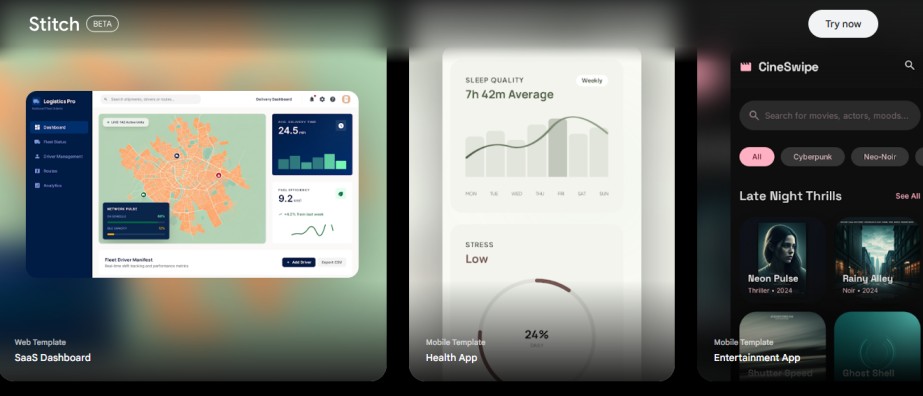
🔹 Step 1: Start with a Simple Prompt
The magic of the Google Stitch AI tool begins with words.
Type something like:
- “A modern food delivery app”
- “A fitness tracking mobile app UI”
- “A clean SaaS dashboard for analytics”
Within seconds, this AI UI design generator creates multiple screens.
It’s like describing your dream house and instantly seeing it built in front of you.
🔹 Step 2: Upload Sketches or Screenshots
You can upload rough drawings and use competitor screenshots.
The Google Stitch AI tool converts them into high-quality UI.
This is where the free AI tool for app and website design with frontend code generation becomes insanely powerful.
🔹 Step 3: Refine Using Chat
Now comes the fun part.
You can say: “Change colours to dark mode”, “Add login screen”, or “Make buttons rounded”.
The AI UI design generator updates your design instantly.
It feels like talking to a designer who never gets tired.
🔹 Step 4: Use Voice Commands (2026 Update)
The 2026 upgrade lets you speak to the canvas.
You can literally say:
“Add a checkout page”
And it appears.
This is one of the most exciting Google Stitch features for rapid prototyping and UI design in 2026.
🔹 Step 5: Export Frontend Code
This is where beginners win big.
The Google Stitch AI tool generates:
- HTML
- CSS
- Tailwind
- React code
Now you don’t just have design, you have a working starting point.
👉 This makes it a true free AI tool for app and website design with frontend code generation.
🔹 Step 6: Export to Figma & Prototype
You can:
- Export to Figma
- Create clickable prototypes
This helps in:
- Freelance projects
- Client presentations
- Startup MVPs
These are key Google Stitch features for rapid prototyping and UI design in 2026.
Why This Tool Matters for Beginners
The Google Stitch AI tool removes 3 major barriers:
1. No Design Skills Needed
You don’t need to understand UI principles.
The AI UI design generator handles layout, typography, and colours.
2. No Coding Skills Needed
Frontend code is generated automatically.
This is why it’s called a free AI tool for app and website design with frontend code generation.
3. Faster Than Traditional Methods
What used to take days now takes minutes.
It’s like switching from walking to driving a sports car.
What Stops Most People
Even with the Google Stitch AI tool, people struggle.
Here are some common mistakes:
- Writing vague prompts
- Expecting perfect designs instantly
- Not refining outputs
- Ignoring usability
Also, remember:
❌ It’s not a full design system like Figma
❌ Sometimes layouts need adjustments
❌ AI is powerful, but not perfect
How to Use It Smartly
To get the best results from the Google Stitch AI tool, follow this approach:
✔ Be Specific with Prompts
Instead of: “Make an app”
Say:
“Create a minimal food delivery app with dark mode and bold typography”
✔ Iterate Like a Pro
Use chat to refine:
- Layout
- Colors
- Features
This is where the AI UI design generator shines.
✔ Combine with Learning
Use generated code to learn frontend basics and build real projects
✔ Focus on Use Cases
The best Google Stitch features for rapid prototyping and UI design in 2026 are useful for freelancing, startup MVPs and portfolio projects.
Limitations
Like most AI tools, it’s not perfect. For example, while it’s great for quickly generating app screens, it’s not a full design system like Figma, so if you’re managing complex components or working with a big team, you might hit limitations.
Also, sometimes the AI can get things slightly wrong, like misplacing buttons or creating layouts that don’t fully make sense. Think of it like a smart assistant that gets you 80% there; you’ll still need to step in, tweak things, and polish the final design before using it professionally.
The question is: How You Can Make Money with it
This is where things get exciting.
Using the Google Stitch AI tool, you can:
💼 1. Offer UI Design Services
Clients don’t care how you design; they care about results.
🌐 2. Build Landing Pages
Use generated code to launch websites fast.
📱 3. Create App Prototypes
Sell MVP designs to startups.
🎓 4. Start Freelancing
Even beginners can use this AI UI design generator to get clients.
It’s like having a shortcut to skills others spend years learning.
FAQ
1. What is the Google Stitch AI tool?
The Google Stitch AI tool is a browser-based platform that converts prompts into UI designs and frontend code, making it a leading AI app design tool in 2026.
2. Is Google Stitch free?
Yes, it is a free AI tool for app and website design with frontend code generation, with monthly usage limits.
3. Can beginners use Google Stitch?
Absolutely. The AI UI design generator is built for users with no experience or skills.
4. Does it generate real code?
Yes, the Google Stitch AI tool exports HTML, CSS, Tailwind, and React code.
5. Is it better than Figma?
It’s different. Figma is for detailed design systems, while the Google Stitch AI tool excels in rapid prototyping.
CONCLUSION
The future of app design is here. It’s faster, simpler, and more accessible than ever.
The Google Stitch AI tool is not just another AI app design tool, 2026; it’s a complete shift in how ideas become reality.
If you’ve been waiting for the “right time” to start:
This is it.
With tools like this:
- You don’t need experience
- You don’t need advanced skills
- You just need ideas
It’s like turning your thoughts into digital products the same way a writer turns ideas into words.
What You Should Do Next
- Go to Google Stitch
- Type your first app idea
- Generate your first UI
- Export code
- Start building or freelancing
Don’t overthink it.
Start messy. Learn fast. Improve daily.
Because in 2026…
👉 The people who win are not the most skilled; they’re the ones who take action with tools like the Google Stitch AI tool.